I tested Azure Virtual Desktop RemoteAppV2
Categories:
Microsoft announced RemoteAppV2 under some pretty enhancements on top of the older RemoteApp engine. This newer version has some improvements like:
- Better multi monitor support
- Better resizing/window experience
- Visuals like window shadows
I cannot really show this in pictures, but if you test V2 alongside V1, you definitely notice these small visual enhancements. However, a wanted feature called “drag-and-drop” is still not possible on V2.
Source: https://learn.microsoft.com/en-us/azure/virtual-desktop/remoteapp-enhancements
How to enable RemoteAppV2
To enable RemoteAppV2, you need to set a registry key as long as the preview is running. Make sure you are compliant with the requirements as described on this page (client + hosts):
https://learn.microsoft.com/en-us/azure/virtual-desktop/remoteapp-enhancements#prerequisites
We can do this manually or through a Powershell script which you can deploy with Intune:
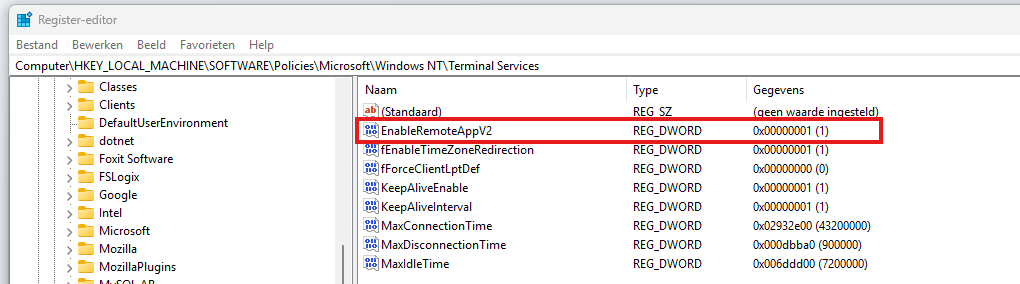
- Key: HKLM\Software\Policies\Microsoft\Windows NT\Terminal Services
- Type: REG_DWORD
- Value name: EnableRemoteAppV2
- Value data: 1
$registryPath = "HKLM:\Software\Policies\Microsoft\Windows NT\Terminal Services"

if (-not (Test-Path $registryPath)) {
    New-Item -Path $registryPath -Force | Out-Null
}

New-ItemProperty `
    -Path $registryPath `
    -Name "EnableRemoteAppV2" `
    -PropertyType DWord `
    -Value 1 `
    -Force | Out-Null
This should look like this:
Check out the status
When enabled the registry key, the host must be restarted to make the changes effective. After that, when opening a Remote App, press the following shortcut:
- CTRL + ALT + END
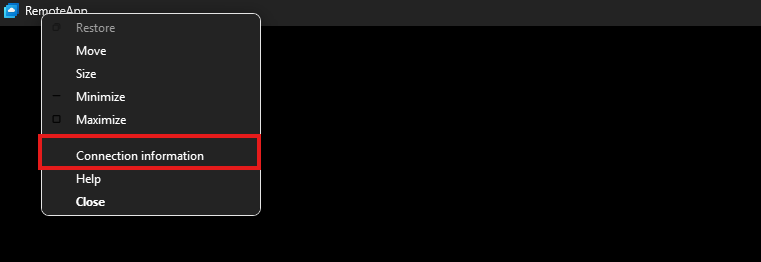
Then right click the title bar and click Connection Information
This gives you the RDP session information, just like with full desktops.
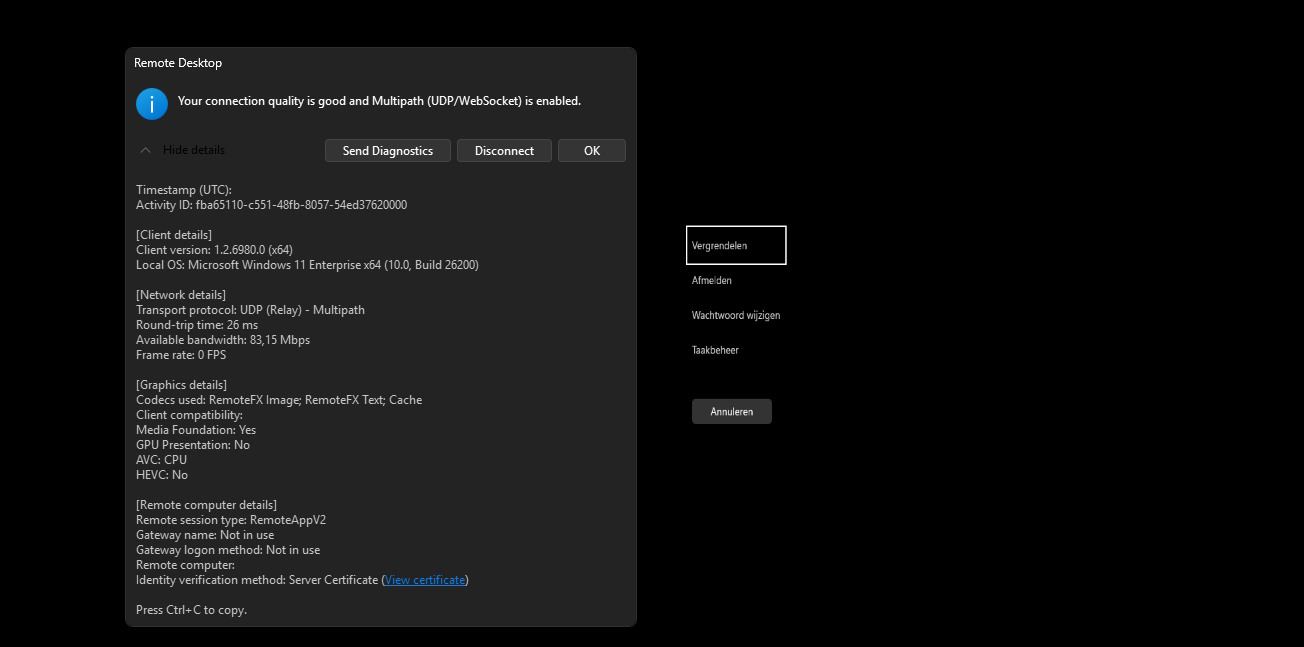
Under the Remote session type, you must see RemoteAppV2 now. Then the new enhancements are applied.
Downsides of RemoteAppV2
The one thing which pushes me away from using RemoteApp is the missing drag and drop functionality. This is something a lot of users want when working in certain applications. This V2 version also lacks this functionality.
I also couldn’t get it to work with the validation environment setting only. In my case, I had to create the registry key.
Sources
These sources helped me by writing and research for this post;
End of the page 🎉
You have reached the end of the page. You can navigate through other blog posts as well, share this post on X, LinkedIn and Reddit or return to the blog posts collection page. Thank you for visiting this post.
If you think something is wrong with this post or you want to know more, you can send me a message to one of my social profiles at: https://justinverstijnen.nl/about/
If you find this page and blog very useful and you want to leave a donation, you can use the button below to buy me a beer. Hosting and maintaining a website takes a lot of time and money. Thank you in advance and cheers :)

The terms and conditions apply to this post.