How to learn Azure - My learning resources
Categories:
When starting to learn Microsoft Azure, the resources and information can be overwhelming. At this page I have summarized some resources which found out during my Azure journey and my advice on when to use what resource.
To give a quick overview of all the training resources I used throughout the years and give you different types and sorted the resources from beginning to end:
- Text based
- Video’s
- Labs and Applied Skills
1. Starting out (Video and text-based)
When starting out, my advice is to first watch the following video of John Savill explaining Microsoft Azure and giving a real introduction.
https://www.youtube.com/watch?v=_x1V2ny8FWM
After this, there is a Microsoft Learn collection available which describes the beginning of Azure:
Starting out (Video) Starting out (Text)
2. Creating a free trial on Azure
Because we are learning to understand, administer and later on architecting a solution, it is very crucial to have some hands-on experience with the platform. I really recommend you to create a free account to explore the portal, its features and its services.
When you have a creditcard you can sign up for a free 150 to 200 dollar budget which is free. When the budget is depleted there are no costs involved till you as user agree with costs.
My advice is to explore the portal and train yourself to do for example the following:
- Create a virtual machine and connect to it
- Create a virtual network and network peering
3. Get your Azure Fundamentals (AZ-900) certification
When having some experience with the solutions, it is great to learn for your AZ-900 Azure Fundamentals certification. Its a great way to express yourself to the world that you have the knowledge of what Azure is.
Learning for the AZ-900 certification is possible through the following source:
Microsoft Learn: https://learn.microsoft.com/en-us/training/courses/az-900t00#course-syllabus
After you have done the complete cource, i recommend you watch the Study Cram of John Savil vor AZ-900. He is a great explainer of concepts, and he explains every detail you need to know for the exam including some populair exam questions.
John Savil: https://www.youtube.com/watch?v=tQp1YkB2Tgs
John has a extra playlist for each concept where he will go deeper into the subject than in the cram. You can find that here: https://www.youtube.com/playlist?list=PLlVtbbG169nED0_vMEniWBQjSoxTsBYS3
AZ-900 Text course AZ-900 Video course AZ-900 Study Cram
4. AZ-104 Interactive guides
When you have AZ-900 in the pocket, you can go further by getting AZ-104, the level 2 Azure certification. This certification goes deeper into the concepts and technical information than AZ-900. After you get AZ-104, Microsoft wants you to be prepared to administer Azure and environments.
You can follow the AZ-104 Microsoft Learn collection which can be found here: https://learn.microsoft.com/nl-nl/training/paths/az-104-administrator-prerequisites/
Also, in the modules there are some interactive guides. These are visual but you cant do anything wrong. Great way to do things for the first time. I have the whole collection for you here:
https://mslabs.cloudguides.com/guides/AZ-104%20Exam%20Guide%20-%20Microsoft%20Azure%20Administrator
When wanting to have some great hands-on experience and inspiration for your Azure trial/test environment, there are some practice labs available based on the interactive guides to build the resources in your own environment. You can find them under heading 8.
AZ-104 Interactive labs AZ-104 Text course
5. Complete the AZ-104 cram of John Savill
When finished with all the labs and modules and maybe your own research you are ready to follow the study cram of John Savill for AZ-104. He is a great explainer and summarizes all the concepts and stuff you need to know for the exam. When you don’t know the term he explains, you have to work on that.
The video can be found here:
https://www.youtube.com/watch?v=0Knf9nub4-k
6. Do a AZ-104 practice exam
When knowing everything John axplained, you are ready to do a practice exam. You can find it here:
I have one note when using the practice exams for training. The actual exam is harder than the practice exam. In the practice exam, you only have to select one or multiple answers about “simple questions”. In the actual exam you get questions like:
- Single/Multiple choice
- Drag and drop in order or terms to explaination
- Hot Area: You get one or more pictures about a configuration and you have to spot an error, configuration, mistake etc.
7. Do some Micrsoft Azure Applied Skills
Microsoft has some great Applied Skills where you have to perform certain hands-on specialized tasks in different solutions, such as Azure. It works as simple as: you get a lab simulation, you perform 2 to 8 tasks and you submit the assessment.
You can retry them in a few days after failing, and of course, it is meant to better understand how to perform the actions so you are able to do this in practice. I really advice you to not only brute force the assessments but really understand what you are doing. Only this prepares you in a good way for working with Azure.
There are some great assessments available for Azure and Windows Server which I all completed and liked a lot:
- Homepage: https://learn.microsoft.com/en-us/credentials/browse/?credential_types=applied%20skills
- Securing Azure Storage: https://learn.microsoft.com/en-us/credentials/applied-skills/secure-storage-azure-files-azure-blob-storage/
- Azure Monitor: https://learn.microsoft.com/en-us/credentials/applied-skills/deploy-and-configure-azure-monitor/
- Migrating SQL server to Azure SQL: https://learn.microsoft.com/en-us/credentials/applied-skills/migrate-sql-workloads-azure-sql-database/
- Securing network access with Azure Firewall: https://learn.microsoft.com/en-us/credentials/applied-skills/configure-secure-workloads-use-azure-virtual-networking/
- Azure Arc: https://learn.microsoft.com/en-us/credentials/applied-skills/deploy-and-manage-microsoft-azure-arc-enabled-servers/
8. Do the AZ-104 Github Labs (subscription required)
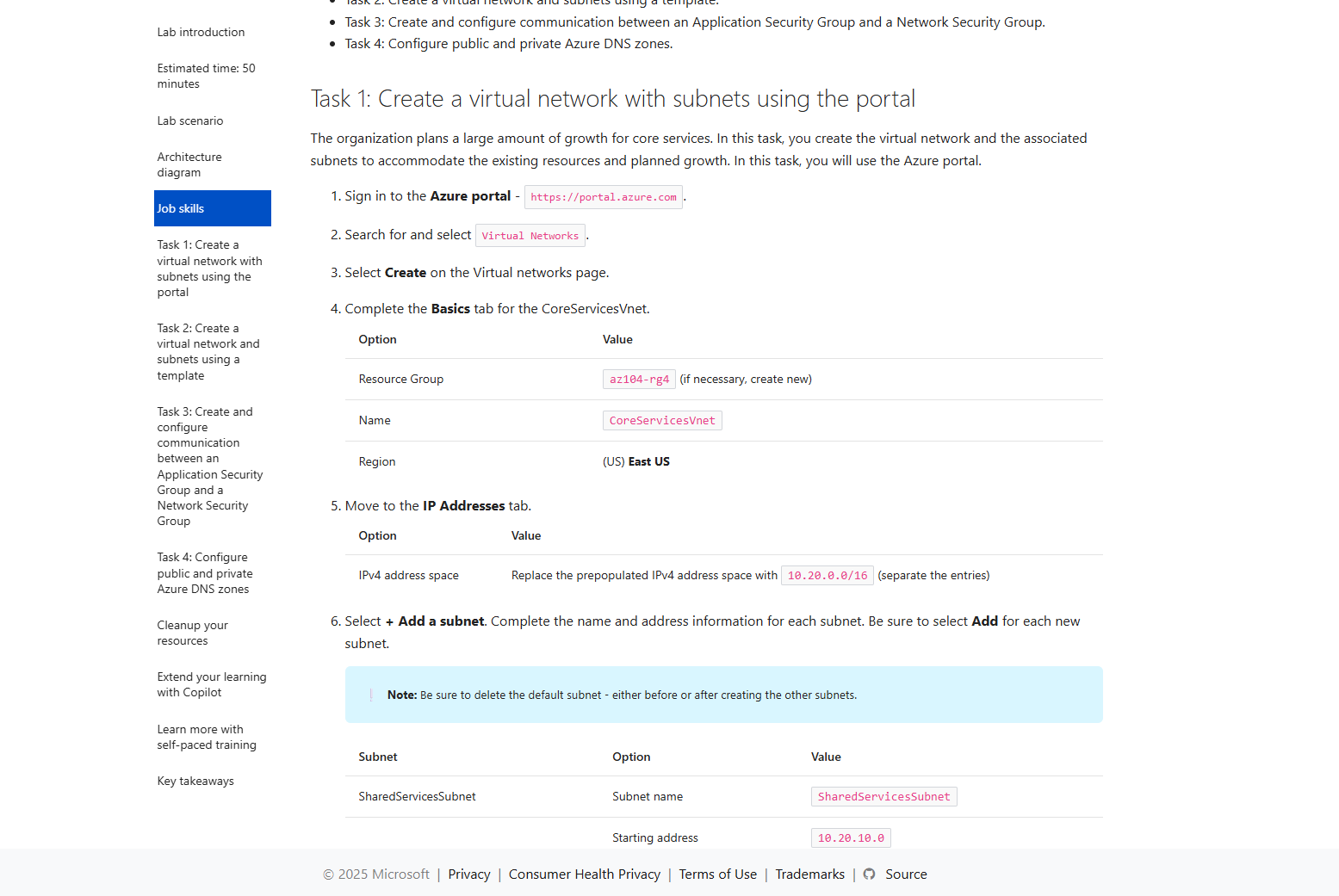
Microsoft has published a lot of labs to do in your own environment to be familiar with the Azure platform. These are real objectives you have to do, and in my Azure learning journey I found these the most fun part to do of all study recourses.
However, it requires you to have an Azure subscription to click around and deploy some resources, but some tips to have this actually really cheap:
- Delete resources after finishing the lab
- Shutdown VMs when not using
- Pick cheap options, not “Premium” options
9. Get your AZ-104 certification
After doing everything on this page and knowing everything John explained in the study cram, you are ready to take the exam for AZ-104. The most important parts are that you must have some hands-on experience in Azure which I did really cover but the more experience you have, the more chance of success.
Good luck!
10. Possible follow-ups on AZ-104
After you have the AZ-104 certification, you can pursue multiple paths to further broaden your Azure knowledge and journey:
- Azure Virtual Desktop (AZ-140)
- Azure Architect (AZ-305)
- Azure Networking Engineer (AZ-700)
- Azure Security Engineer (AZ-500) or Security Architect (SC-100)
Also I really recommend doing these labs if you are pursuing a career in Azure Networking or networking in general:
These are specialized labs like heading 4 of this page but then for networking and securing incoming connections.
End of the page 🎉
You have reached the end of the page. You can navigate through other blog posts as well, share this post on X, LinkedIn and Reddit or return to the blog posts collection page. Thank you for visiting this post.
If you think something is wrong with this post or you want to know more, you can send me a message to one of my social profiles at: https://justinverstijnen.nl/about/
If you find this page and blog very useful and you want to leave a donation, you can use the button below to buy me a beer. Hosting and maintaining a website takes a lot of time and money. Thank you in advance and cheers :)

The terms and conditions apply to this post.