Update your Kerberos configuration with Azure Virtual Desktop (RC4)
Categories:
Microsoft released that the Kerberos protocol will be hardened by an update coming in April to June 2026 to increase security. This was released by Microsoft here:
At first, they are not very specific about how to check what Kerberos encryption your environment uses and how to solve this before becoming a problem. I will do my best to explain this and show you how to solve it.
Microsoft already introduced Kerberos-related hardening changes in updates released since November 2022, which significantly reduced RC4 usage in many environments. However, administrators should still verify whether specific accounts, services or devices are explicitly or implicitly relying on RC4 before disabling it. In this guide, I will explain to you how to do this.
The update and protocols described
Kerberos is the authentication protocol used in Microsoft Active Directory Domain Services. This is being used to authenticate yourself to servers and different services within that domain, such as an Azure Files share.
Kerberos works with tickets and those tickets can be encrypted using different encryption types, where we have two important ones:
- RC4-HMAC: This protocol is deprecated and the whole point of this blog is to disable this protocol. The deprecation is because of the unsafety and the possible attack surface
- AES-256: This is a newer protocol being used from about 2022 till now and is the more secure option to encrypt Kerberos tickets which we must use from today
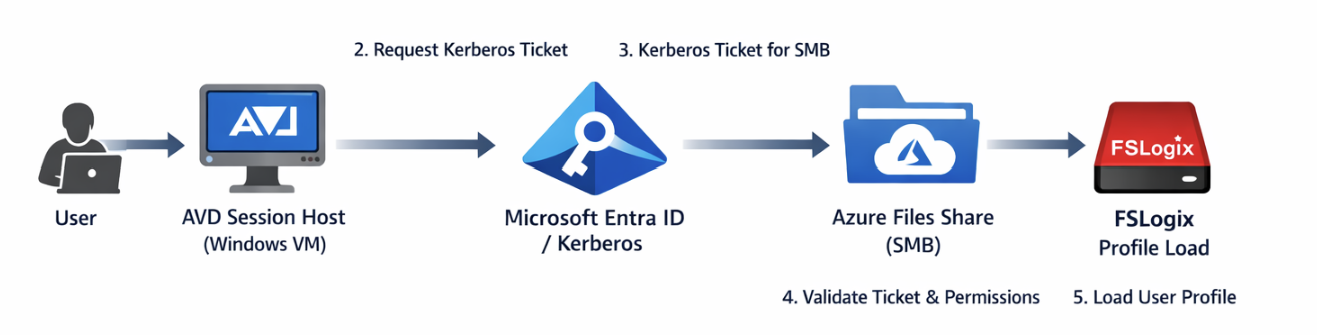
These tickets are being granted in step 3 of the diagram below:
Impacted resources
The resources impacted by this coming update and protocol deprecation are all sorts of domain-joined dependencies using Kerberos tickets, like AD DS-joined Azure Files shares.
However, this scope may not be limited to Azure Files or FSLogix only. Any resource that depends on Kerberos authentication can be affected if RC4 is still being used somewhere in the chain. This can include file servers, SMB shares, legacy service accounts, older joined devices, third-party appliances and applications that rely on Active Directory authentication. In many environments, the real risk is not the primary workload itself, but an older dependency that still expects RC4 without this being immediately visible.
Check your configuration - Azure Portal
We can check our current storage account configuration in Azure to check if we still use both protocols or only the newer AES-256 option by going to the storage account:
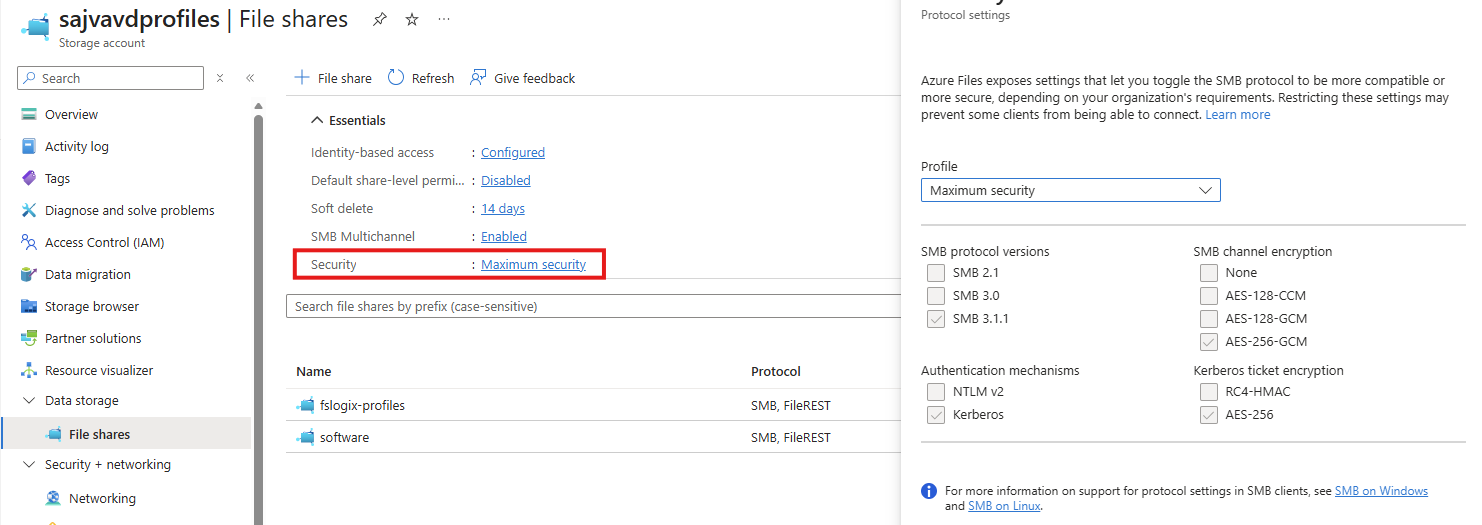
By clicking on the “Security” part, we get the overview of protocols being used by AD DS, Kerberos and SMB. This part goes about the part in the bottom right corner (Kerberos ticket encryption):
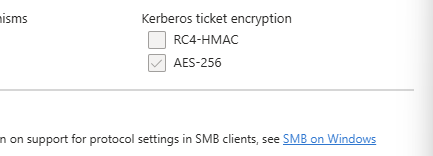
If you are already using the maximum security preset, you don’t have to change anything and you are good to go for the coming updates.
After the hardening updates coming to Windows PCs and Windows Server installations, the RC4-HMAC protocol will be phased out and not available to use, so we must take steps to disable this protocol without user disruption.
Check your configuration - PowerShell
To check different server connections in your Active Directory for other resources, you can use this command. This will show the actual encryption method by Kerberos used to connect to a resource.
Replace “servername” with the actual file server you connect to.
klist get cifs/servernameFor example:
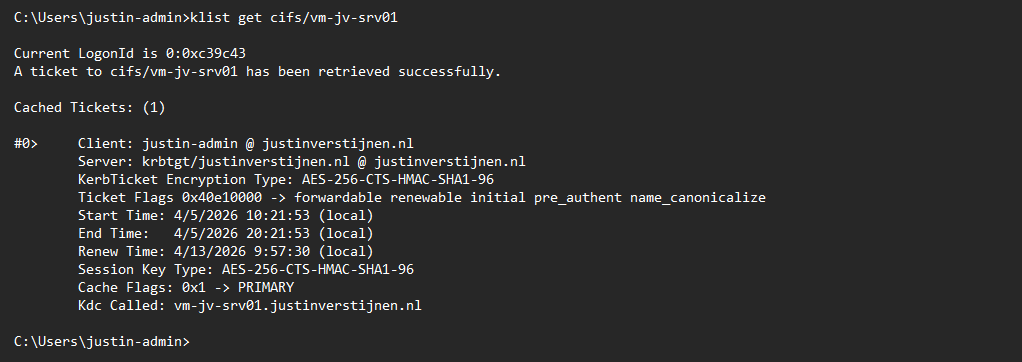
This returns the information about the current Kerberos ticket, and as you can see at the KerbTicket Encryption Type, AES-256 is being used, which is the newer protocol.
You can also retrieve all current tickets on your computer to check all tickets for their encryption protocol with this command:
klistCheck your configuration - Active Directory
In our Active Directory, we can audit if RC4 encryption is being used. The best and easiest way is to open up the Event Logs on a domain controller in your environment and check for these event IDs:
- Event ID 4768
- Event ID 4769
You can also use this PowerShell one-liner to get all RC4 events in the last 30 days.
Get-WinEvent -FilterHashtable @{LogName='Security'; Id=4768,4769; StartTime=(Get-Date).AddDays(-30); EndTime=(Get-Date)} | Select-Object TimeCreated, Id, MachineName, Message | Format-Table -AutoSize -WrapIf there are any events available, you can trace what resource still uses this older encryption and what possibly can be impacted after the update. If no events show, then your environment is ready for this upcoming change.
My advice is to check this on all your domain controllers to make sure you have checked all types of RC4 requests.
Change protocols of Storage account in Azure Portal
As Microsoft already patched this in November 2022, we can disable the RC4-HMAC protocol in the Azure Portal. Most Windows versions supported today already are patched, disabling the RC4-HMAC by default but optional if scenarios still require this protocol.
In my environment, I am using a Windows 11-based AVD environment and have a Domain Controller with Windows Server 2022. I disabled the RC4-HMAC without any problems or user interruption.
Although, I highly recommend performing this change during off-business hours to prevent any user interruption.
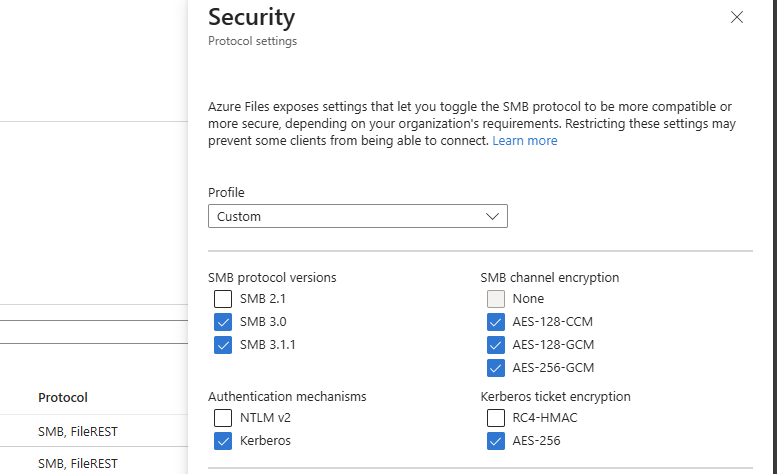
If the protocol is disabled and FSLogix still works, the change has been successfully done. We prepared our environment for the coming change and can now possibly troubleshoot any problems instead of a random Windows Update disabling this protocol and impacting your environment.
Summary
This blog post described the deprecation of the older RC4-HMAC protocol and what can possibly impact your environment. If using only modern operating systems, there is a great chance you don’t have to change anything. However, if older operating systems than Windows 11 are being used, this update can possibly impact your environment.
If your environment already uses AES-based Kerberos encryption for Azure Files, FSLogix and other SMB-dependent workloads, you are likely in a good position. If not, now is the right time to test, remediate and switch in a controlled way instead of finding out after the Windows updates are installed. We IT guys like controlled change of protocols where we actually know what could impact different workloads and give errors.
Thank you for visiting this page and I hope it was helpful.
Sources
These sources helped me by writing and research for this post;
End of the page 🎉
You have reached the end of the page. You can navigate through other blog posts as well, share this post on X, LinkedIn and Reddit or return to the blog posts collection page. Thank you for visiting this post.
If you think something is wrong with this post or you want to know more, you can send me a message to one of my social profiles at: https://justinverstijnen.nl/about/
If you find this page and blog very useful and you want to leave a donation, you can use the button below to buy me a beer. Hosting and maintaining a website takes a lot of time and money. Thank you in advance and cheers :)

The terms and conditions apply to this post.